


The open window function is a setting on your thermostat that will detect when a nearby window is open, letting in outside air and will adjust the temperature accordingly.
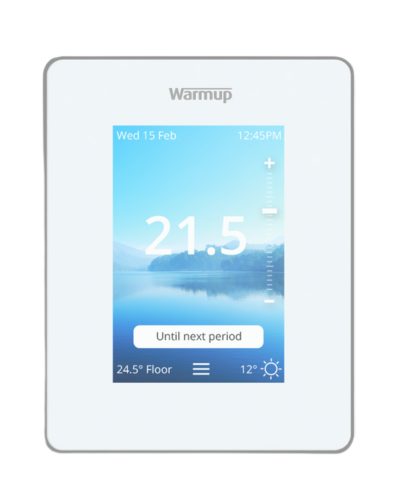
6iE Smart Thermostat
Home / Thermostats
The 6iE is the world’s first smart phone screen quality thermostat. Controlled from a smartphone, tablet or computer, the 6iE Smart WiFi Thermostat is capable of controlling your heating based off of your proximity to home and local forecast to save you time and money. Download MyHeating app on the app store or connect to the web portal my.warmup.com. Comes with a 12-Year warranty.
Setting the time and date on your thermostat is important for proper program function. Follow along with the below video or instructions specific to your thermostat.
The 6iE is only available in Smart WiFi. If you prefer to use your 6iE without WiFi, the video/instructions below will show you how to turn it off.
Setting the time and date on your 6iE is important for proper program function. Follow along with the below video or instructions to set yours.
Set your 6iE Smart Thermostat into Manual Mode for a fixed target temperature until you change mode or temperature.
Setting into manual mode allows you to set a fixed target temperature for the thermostat to achieve. The thermostat will continue to maintain this temperature until another operating mode or temperature has been selected. Related: Terra Manual Mode 6iE Manual Mode
Uploading a background using the MyHeating app is an effortless process. If you’d like to learn how to do so, follow the simple steps down below. The thermostat to the left has the dark background selected. Light, Dark, or Black Background First, open the MyHeating app. Scroll to your thermostat and select the background icon. […]
The 6iE Thermostat’s custom background screen is 3 1/2 inches diagonally. However, image scaling is not required thanks to auto-scaling when you upload your custom background. Tips for 6iE Custom Background Image Uploads Make sure the image you use has a 4:3 landscape aspect ratio (standard camera aspect ratio), to avoid the image being stretched […]
The lock icon on the 6iE Smart Thermostat represents that the thermostat has gone into standby mode. It will show at the bottom center of your thermostat.
Wondering about the maximum load of the Warmup 6iE thermostat? Find the information you are looking for here in this post.
Curious about what types of heating systems the 6iE thermostat is compatible with? Find your answer here in this post!
Are you looking for the dimensions of the 6iE? Find a detailed diagram with all the dimensions you are looking for here in this post.
Do you have an old Warmup thermostat that you’d like to upgrade to the 6iE? Learn all you need to know in this post.
Do you have multiple smart thermostats from Warmup in your home? They can all be controlled by a single app – the MyHeating app.
Are you experiencing issues connecting your 6iE to WiFi? Find some useful tips for resolving this issue here in this post.
It’s possible to ‘share’ a location with another user. This is done through the web portal in the ‘edit location’ section. Here, the user can add more users to their location. Invitation access is sent via email for new users to set up their own account. Watch step-by-step: (If you prefer, you can continue scrolling […]
Are you searching for a thermostat to use with your underfloor heating system? Learn more about compatibility here!
The ER1 message will also occur if no floor sensor is connected to the thermostat. Have your electrician make sure that the sensor probe wires are securely connected in ports 1 and 2 of the thermostat. If sensor was not installed, your thermostat can be programmed to read the air temperature instead by following the steps below.
Bathroom Collection
- 3iE Energy-Monitoring Thermostat
- 4iE Smart WiFi Thermostat
- DCM-PRO Cable
- DCM-PRO Fleece-Back Membrane
- DCM-PRO Peel-And-Stick Membrane
- DCM-PRO Waterproofing Kit
- Heating Mats – DWM
- Loose Wire – NADWS
- Mirror Defoggers
- Tempo Thermostat
- TH115 Floor Heating Thermostat
- Towel Warmers
- UCCG-4991 Floor Heating Thermostat
- Warmup Insulation Boards – Ultralight
Floor Heating
- DCM-PRO Cable
- DCM-PRO Fleece-Back Membrane
- DCM-PRO Peel-And-Stick Membrane
- DCM-PRO Waterproofing Kit
- Dual Cable Tester
- Foil Heating System – FOIL
- Heating Mats – DWM
- Loose Wire – NADWS
- Warmup Inslab Cable – INSLAB
- Warmup Insulation Boards – Ultralight
Insulation
Outdoor Controllers
- APS-3C
- CDP 2 Remote Control
- CIT-1
- COMMBOX-600
- DS 5 Outdoor Snow Melting Controller
- DS 8 Outdoor Snow Melting Controller
- DS 9 Outdoor Snow Melting Controller
- DS-2C Outdoor Snow Melting Controller
- ETO2 Snow and Ice Melting Controller
- ETO3 Outdoor Snow Melting Controller
- ETOG – Ground Sensor
- GF-PRO
- GIT-1
- SIT-6E
- SNOPRO-100 Series
- TRF-115-005- Roof & Gutter Deicing
- WSM-252W Smart WiFi Panel
- WSM-63 Relay Timer Panel
Pipe Trace
Repairs
- Digital multimeter
- Infrared Thermal Camera
- Megger (acc-megg)
- Repair – Outdoors
- Repair Kit – End Cap
- Repair Kit – Joint
- Repair Kit – Wire
- TDR Meter Cable Tester